
Workforce management software is the system a business uses to track time and attendance, schedule shifts, manage leave and turn approved hours into payroll. We compared 26 workforce management tools on features, pricing and fit, using each vendor's own pricing page, and explain what WFM software costs, how it helps with compliance and how to choose one.
The best workforce management software in 2026 is TeamTrackin for teams that need time tracking, attendance, leave, payroll records and shift scheduling in one platform, for both office and field staff. Hubstaff and Time Doctor lead for remote monitoring, Clockify for a free plan, Buddy Punch for hourly punch-in, and Rippling or Workforce.com for enterprise HR and payroll suites.
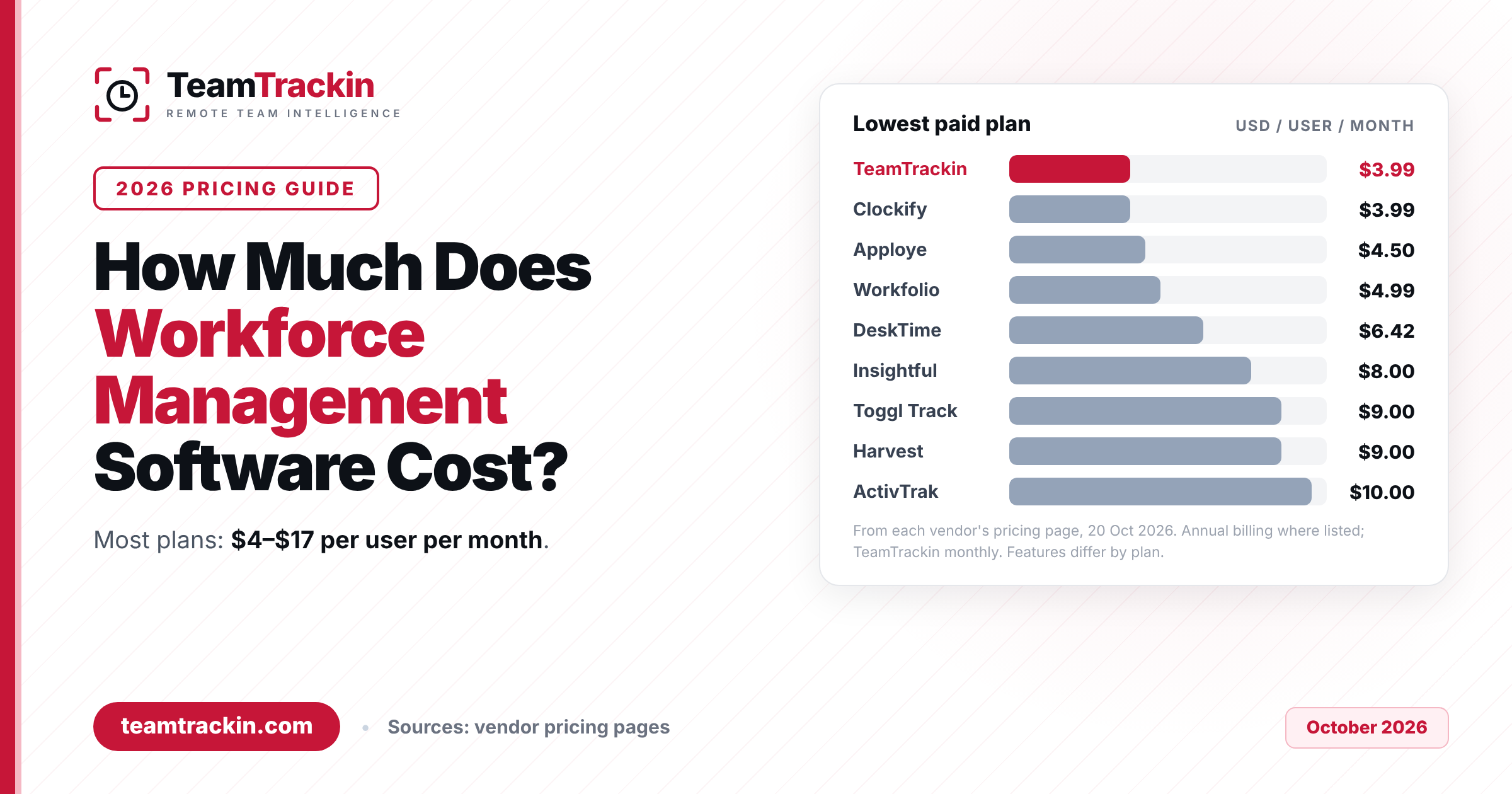
Pricing is mostly per user per month: TeamTrackin starts at $3.99, Clockify at $3.99 billed annually, Apploye at $4.50 billed annually and Buddy Punch at $19 a month plus $4.99 per user. Enterprise suites such as Rippling, Workforce.com and Teramind are quote only, and most tools offer a 7- to 30-day free trial.
What Is Workforce Management Software?
Workforce management software (WFM software, sometimes written as work force management software or shortened to workforce mgmt software) is a platform that helps a business plan, track and pay its people. It answers four questions every manager has: who is working, where, on what, and how many hours do we owe them for?
A modern workforce management system pulls together jobs that used to live in separate places: a time clock or desktop tracker, a shift rota, a leave calendar, timesheet approvals, overtime rules and a payroll export. Instead of copying hours from one spreadsheet into another, the data flows from the moment someone clocks in to the moment they are paid.
Workforce management solutions now come in a few distinct shapes, and knowing which one you need saves a lot of demos:
- All-in-one workforce management platforms cover tracking, attendance, scheduling, leave and payroll records together (TeamTrackin, Rippling, Workforce.com).
- Time and attendance tools focus on clocking in and out, PTO and payroll-ready hours (Buddy Punch, Clockify, WFM Software Solutions).
- Employee monitoring and analytics tools measure activity and productivity for remote teams (Hubstaff, Time Doctor, Insightful, ActivTrak, Teramind).
- Project time trackers log billable hours against clients and projects (Toggl Track, Harvest, Everhour, Timely, Paymo).
Contact centres also use "WFM" for forecasting call volumes and intraday staffing. That is a specialised branch of the category; this guide covers the employee workforce management software most small, mid-size and enterprise teams buy.
Workforce management software is a system that tracks employee time and attendance, schedules shifts, manages leave and overtime, approves timesheets and sends accurate hours to payroll. It gives managers one view of who is working, where and at what cost, and replaces spreadsheets, paper rotas and disconnected apps.
How a WFM App Works: A 5-Step Tutorial
Whichever workforce management platform you pick, day-to-day use follows the same loop. Here is how to use a WFM app from first login to payroll, using the steps most tools share.
Set up your company and people
Create your workspace, invite employees and set each person's role, pay cycle, pay rate, time zone and working limits. For field teams, add job sites with an address and a geofence radius.
Build the schedule
Publish a weekly rota or set standard working hours. Good tools warn you about double bookings, approved leave and rest-period rules before you publish, and notify staff when shifts change.
Track time and attendance
Office and remote staff track time on a desktop app or web timer; field staff clock in on a phone or a site kiosk. The system records late arrivals, no-shows, breaks and overtime automatically.
Approve timesheets, leave and overtime
Managers review submitted timesheets, time-off requests and overtime claims in one queue. Once approved, the hours and pay should be locked so later edits can't silently change what was paid.
Send hours to payroll and report
Export approved hours as payroll-ready files or sync them to your payroll provider, then use reports on attendance, labour cost and productivity to plan next month's staffing.
Rule of thumb: if a step in this loop still needs a spreadsheet, your workforce management software isn't doing its job yet.
Features Every Workforce Management System Needs
Workforce management tools vary a lot in scope. These are the capabilities that separate a complete workforce management system from a simple timer. Use them as your shortlist criteria.
Only a handful of the 26 tools combine desk time tracking with field features such as GPS clock-in and shift scheduling in one product. Most specialise: monitoring tools rarely schedule shifts, and scheduling tools rarely track remote desk work. If your business has both office and site staff, check this first.
Workforce Management Software Comparison Table
Here is every tool in this guide side by side. Prices are the lowest paid per-user price shown on each vendor's own pricing page on 20 October 2026, on annual billing where the vendor lists it; TeamTrackin's prices are monthly. Click a name to jump to the full review.
| Tool | Type | Paid plans from | Free option | Scheduling | GPS clock-in | Payroll |
|---|---|---|---|---|---|---|
| 1. TeamTrackin | All-in-one WFM | $3.99/user/mo | 14-day trial | ✔ (Shift) | ✔ (Shift) | Payroll records, payslips, CSV |
| 2. Hubstaff | Time tracking + monitoring | ~$7/seat/mo* | 14-day trial | Shift tracking | ✔ | Payouts via partners |
| 3. Time Doctor | Monitoring + analytics | ~$6.67/user/mo* | 14-day trial | Standard+ | — | Standard+ |
| 4. Clockify | Time tracking | $3.99/seat/mo | Free up to 5 | Pro | Pro | Labour cost (Pro) |
| 5. Buddy Punch | Time clock | $19 + $4.99/user/mo | 14-day trial | Pro (add-on on Starter) | ✔ | Add-on |
| 6. Rippling | HR + payroll + IT | Quote | Demo | ✔ | — | ✔ |
| 7. Workforce.com | Scheduling + payroll + HR | Quote | Demo | ✔ | — | ✔ |
| 8. Apploye | Monitoring | $4.50/user/mo | Free up to 10 | Elite+ | — | ✔ |
| 9. Insightful | Workforce analytics | $8/seat/mo | 7-day trial | — | — | Combo plan |
| 10. ActivTrak | Productivity analytics | $10/worker/mo | Free up to 3 | Adherence only | — | — |
| 11. DeskTime | Automatic tracking | $6.42/user/mo | 14-day trial | Premium | — | — |
| 12. Toggl Track | Project time tracking | $9/user/mo | Free plan | — | — | Labour cost (Premium) |
| 13. Harvest | Timesheets + invoicing | $9/seat/mo | Free for 1 seat | Via Forecast | — | — |
| 14. Everhour | Project time tracking | $8.50/seat/mo | Free up to 5 | ✔ | — | — |
| 15. Timely | Automatic timesheets | $9/user/mo | 14-day trial | Planning (Premium+) | — | — |
| 16. Paymo | Projects + time | $15.90/user/mo | Free for 1 user | Pro | — | — |
| 17. ClickUp | Project management | Paid per user* | Free plan | Workload views | — | — |
| 18. Teramind | Security monitoring / DLP | On request | Free trial | — | — | — |
| 19. WorkTime | Non-invasive monitoring | $6.99/employee/mo | Free up to 3 | — | — | — |
| 20. Workfolio | Monitoring | $4.99/user/mo | Free Basic plan | — | — | — |
| 21. Liveforce | Event staffing | ~$90/mo flat* | 14-day trial | ✔ | — | Payment reports |
| 22. WFM Software Solutions | Time & attendance + hardware | Quote | Demo | ✔ | — | — |
| 23. Workleap | Manager / engagement | $4,999 base + $32/manager | Demo | — | — | — |
| 24. TopTracker | Freelancer tracking | Free | Free | — | — | Payments (2% fee) |
| 25. RescueTime | Personal productivity | $10/user/mo | 14-day trial | — | — | — |
| 26. Rize | AI time tracking | $29.99/seat/mo | 7-day trial | — | — | — |
✔ = included; "—" = not listed on the vendor's pricing or home page when we checked; a plan name means the feature starts on that plan. *Hubstaff, Time Doctor and Liveforce did not display prices on their own sites when we checked, so these figures come from third-party pricing listings; ClickUp's page showed two different price grids. Always confirm current pricing with the vendor.
TeamTrackin vs Hubstaff vs Time Doctor vs Clockify vs Buddy Punch
The five tools buyers shortlist most often for employee workforce management software, compared on the features that matter most:
| Feature | TeamTrackin | Hubstaff | Time Doctor | Clockify | Buddy Punch |
|---|---|---|---|---|---|
| Desktop time tracking | ✔ Windows, macOS, Linux | ✔ | ✔ | ✔ | Punch clock |
| Screenshots and activity | ✔ Per-employee toggles | ✔ Optional | ✔ | Activity monitoring (Pro) | Punch photos (Pro) |
| Shift scheduling | ✔ Shift | Shift tracking | Standard+ | Pro | Pro |
| GPS and geofencing | ✔ Shift | ✔ Job sites | — | GPS (Pro) | Geofencing (Pro) |
| Leave / PTO | ✔ Standard+ | ✔ | Standard+ | Standard+ | ✔ |
| Payroll | Payroll records, payslips, CSV exports | Payouts via partners | Standard+ | Labour cost (Pro) | Add-on ($8/user + $49) |
| Client invoicing | ✔ Premium | ✔ | — | Standard+ | — |
| Projects and boards | ✔ Kanban, sprints, Gantt | Project budgets | Projects and tasks | Projects, budgets (Pro) | — |
| Free option | 14-day trial, no card | 14-day trial | 14-day trial | Free up to 5 users | 14-day trial |
| Paid plans from | $3.99/user/mo | ~$7/seat/mo* | ~$6.67/user/mo* | $3.99/seat/mo (annual) | $19 + $4.99/user/mo |
For a deeper head-to-head, see our Hubstaff alternative guide.
The 26 Best Workforce Management Software Solutions in 2026
We ranked these workforce management software solutions on how much of the plan-track-approve-pay loop each one covers, how transparent the pricing is, and which team each suits best. Every price and feature below comes from the vendor's own website in October 2026, unless marked with an asterisk.
TeamTrackin is an all-in-one workforce management platform that covers office, remote and field staff in one account. Desk staff use a desktop tracker for Windows, macOS and Linux that records time automatically, with optional screenshots, keyboard and mouse activity percentages, and app and website usage. Field staff use the TeamTrackin mobile app for GPS clock-in at geofenced job sites, shifts, swaps, time off and pay.
Around the tracking sits the rest of the workforce stack: monthly timesheets with an approval queue, leave and overtime requests, company holidays, payroll records and payslips in roughly 150 salary currencies, projects and agile boards, client invoicing, a client portal, an encrypted vault and SOPs. Time also syncs to Jira, Asana, ClickUp, Linear, Trello, Monday.com and GitHub, so developers don't log hours twice.
Most tools on this list either track desk time or schedule field shifts. TeamTrackin does both in one tenant, and you pay per seat type (desktop, field or both), so a mixed office-and-site business isn't paying for two products.
Hubstaff combines timers on desktop, web and mobile with automatic timesheets, activity levels, app and URL usage, idle time and optional screenshots. Field teams get GPS time tracking with job sites that clock people in and out, and the platform also covers attendance and shift tracking, time off and leave.
Its standout is payments: approved hours can pay out through providers such as Payoneer, Wise, PayPal and Deel. Hubstaff lists 35+ integrations and offers a free 14-day trial with no credit card.
Hubstaff charges per seat for every member, including people who only view reports, although it offers a free Project Viewer role for read-only access.
Time Doctor's Basic plan covers automatic time tracking, screenshots, projects and tasks, and online or offline tracking. Standard adds the workforce management layer: schedules, attendance, time approvals, leave and break tracking, payroll, productivity ratings and 60+ integrations. Premium adds an unusual-activity AI report, video screen recording, an executive dashboard and SSO.
Annual billing gives two months free. Native HRIS and payroll integrations are a paid add-on at $200 per integration per month.
Scheduling, attendance and payroll only start on Standard, so the cheapest plan is a tracker rather than a full workforce management system.
Clockify is free for up to 5 users with unlimited tracking, timesheets and reports. Paid plans add a kiosk and breaks (Basic), time off, invoicing, approvals, attendance and overtime (Standard), then scheduling, GPS tracking, expenses, labour cost and activity monitoring (Pro).
Kiosk-only seats for staff who just clock in and out start at $0.79 per seat per month on annual billing, which keeps costs down for shop-floor workers.
Scheduling and GPS only arrive on Pro ($7.99 per seat per month billed annually), and the free plan limits reports to one month of data.
Buddy Punch is a time clock built for hourly staff. Every plan records GPS location with each punch and includes time-off tracking and payroll integrations. Pro adds geofencing, scheduling, PIN or kiosk punches and webcam photos on punches; Advanced adds real-time GPS and single sign-on.
A full payroll service is available as an add-on for $8 per user per month plus a $49 monthly base fee.
Every plan carries a $19 monthly base fee on top of the per-user price, and scheduling is a $1 per user add-on on the Starter plan.
Rippling is a modular platform that brings HR, payroll and IT together. Its workforce side includes HRIS, time and attendance, scheduling, headcount planning, benefits, recruiting and performance; payroll covers employees, contractors, global payroll and employer of record; IT covers identity, access and device management.
Products are bought on top of the core Rippling platform and are mostly billed per employee per month, with a custom quote based on the modules and headcount you choose.
There is no public price list, and it isn't an activity-monitoring or screenshot tool, so remote-productivity teams will still need a tracker.
Workforce.com sells scheduling, payroll and HR as separate plans or as an All-in-One bundle. Scheduling covers labour forecasting, shift management, communications and an employee app; Payroll covers full-service payroll, time and attendance, wage and hour automation, tax filing and benefits; HR covers onboarding, self-service, performance and applicant tracking.
Its site also has dedicated compliance resources, including Fair Workweek and state-specific pages, which suits US employers with predictive-scheduling rules.
Every plan is "Request Pricing", priced by modules, headcount and implementation, so you can't compare costs without a sales call.
Apploye combines time tracking, screenshot monitoring, app and URL tracking, attendance, shift scheduling, timesheet approval, payroll and invoicing. The free Starter plan covers up to 10 users with limited screenshots and features.
The Power plan adds live screenshots, productive and unproductive app labels, and suspicious-activity and mouse-jiggler detection. The owner account is free, and annual billing is more than 30% cheaper than monthly.
The trial is 10 days, shorter than most, and GPS tracking isn't listed on any plan.
Insightful focuses on workforce analytics: a real-time overview, capacity analysis, app and website usage and screenshots on its entry Workforce Analytics plan. The Combo plan adds work-location insights, customer-service integrations and payroll, while Enterprise adds insider-threat detection, audit logs and SSO.
Screen recording, on-demand screenshots and higher screenshot frequency are add-ons priced per seat. On-premise deployment requires at least 250 employees.
The trial is 7 days, and monthly billing is only offered on select plans.
ActivTrak measures work activity without making screenshots the default. Plans step up from Work Activity Tracking (automatic time tracking, break identification, schedule adherence, app and website usage) to Workforce Management (utilisation against goals, schedule exceptions, work-location policy checks) and Productivity Optimization (workload balance, capacity and headcount planning).
Its comparison table lists HIPAA, GDPR, CCPA and SOC 2 Type 2 across all plans. Screenshots require the separate Screen Details add-on.
ActivTrak only sells annual plans, and it doesn't do payroll, invoicing or field GPS.
DeskTime tracks time automatically and calculates productivity from the apps and documents people use. Premium adds screenshots, shift scheduling, integrations and an API, and the product also offers an absence calendar and project time tracking with integrations such as Jira, Asana and Trello.
Enterprise is aimed at organisations with 200+ users and adds an account manager and employee training.
There is no free plan, and screenshots and shift scheduling are Premium-only.
Toggl Track is a timer-first tool for teams that bill time. Starter adds billable rates, timeline views, PTO and public holidays and team reports; Premium adds labour cost and profitability reports, fixed-fee projects, timesheet approvals, Jira and Asana integrations and SSO.
Add-ons include Time Off Pro at $2 per user per month and Capacity Management at $6 per user per month.
Toggl Track doesn't do screenshots, GPS clock-in or shift scheduling, so it covers the time side of workforce management only.
Harvest pairs simple timesheets with invoicing on every plan, including project estimates. Teams adds team reporting, billable and cost rates and accounting and payment integrations; Enterprise adds timesheet approval, profitability reporting, an activity log and SAML SSO.
Resource scheduling lives in the separate Harvest Forecast product, which connects to every plan.
Timesheet approval is Enterprise-only, and the free plan is limited to 1 seat and 2 projects.
Everhour adds time tracking, budgets, invoicing, scheduling and time off on top of the project tools teams already use, with over 40 integrations. The free plan covers up to 5 seats with time tracking, projects and reports but no integrations.
The Team plan includes all features at one price, which keeps buying simple.
The Team plan has a 5-seat minimum, and annual payments aren't refunded for unused months.
Timely captures work automatically and uses AI to categorise it into timesheets, with project health monitoring and billable-hour reporting on every plan. Premium adds team management, budgets and planning, and Unlimited adds capacity management and overtime and undertime tracking.
The Starter plan is capped at 5 users and Premium at 50, so growing teams move up the tiers quickly.
Timely has no native invoicing and no field or shift features; it is a time and capacity tool.
Paymo combines project management, time tracking and invoicing. Plus adds timesheet reports, project profitability, recurring invoices, estimates and expenses; Pro adds Gantt charts, employee scheduling and workload, timesheet approvals and employee leave management.
The free plan covers one user with unlimited tasks, time tracking and invoices.
Scheduling, leave management and timesheet approvals are Pro-only, the most expensive tier.
ClickUp is a project management platform with built-in time tracking. Time tracking is included from the first paid tier, while timesheets and workload views arrive on higher tiers.
For teams already planning work in ClickUp, the native tracker avoids another app; TeamTrackin also syncs tracked time into ClickUp for teams that want a full workforce layer.
It isn't a workforce management system: there is no attendance, payroll, leave or shift scheduling, and time tracking is trial-only on the free plan.
Teramind is a security-first monitoring platform. Plans step up from Starter to UAM (user activity monitoring with full forensics, SIEM integration and keystroke logging) to DLP (sensitive-content detection, 200 pre-packaged DLP rules and automatic blocking) and Enterprise & Government, which adds OCR and AWS GovCloud or Azure Government availability.
It can run in the cloud or self-hosted, which matters to regulated industries.
Prices weren't shown on its pricing page when we checked, plans start at 5 seats, and keystroke logging is far more invasive than most teams need for workforce management.
WorkTime positions itself as non-invasive: instead of screenshots it offers a screen productivity report, and its optional keystroke counter is off by default. Premium adds attendance and productivity tracking, and Enterprise adds HIPAA-, GLBA- and GDPR-safe modes.
Annual billing gives two months free, and plans start at a single employee.
The Basic plan only logs login and logout times; attendance and productivity start on Premium.
Workfolio tracks computer activity, attendance and timesheets, with app and website usage split into productive and neutral time. The free Basic plan allows unlimited users with screenshots every 10 minutes and 14 days of data history.
Pro adds screenshots every minute, a year of data history, timelapse videos and Excel export, and screenshots can be blurred for privacy.
It is a monitoring and timesheet tool only, with no scheduling, leave, payroll or GPS.
Liveforce is built for staffing businesses that manage event, temporary, promo and freelance workers. It covers a central staff database, recruitment and onboarding, scheduling across multiple jobs, timesheets, expense approval, automatic invoice collection and payment reports.
Pricing is a flat monthly fee rather than per user, which suits agencies with large, fluctuating rosters.
It is specialised for staffing agencies, so it isn't the right fit for an in-house office or remote team.
WFM Software Solutions, part of the AdvT Group, sells time and attendance (iTime), access control (iAccess), scheduling (iScheduling), job costing, HR and a self-service app (MiTime), plus physical clocking terminals and access-control hardware.
It specialises in organisations with complex overtime rules, varied shift premiums and other pay adjustments, and offers both standard and bespoke solutions with consultation, project management and training.
There is no public pricing or free trial; the only route in is a demo.
Workleap, which now includes Officevibe and Pingboard, is a manager platform rather than a time tool. It covers performance reviews, team health and engagement, goals, 1:1s, recognition, an org chart and people directory, and AI briefings for managers.
Use it alongside a workforce management system when engagement and performance are the gap, not hours and rotas.
There's no time tracking, scheduling or payroll, and pricing starts with a $4,999 annual base fee plus $32 per manager per month.
TopTracker from Toptal is free to use. It offers automatic and manual time tracking, optional screenshots and webcam captures, activity levels, automatic timesheets that turn into invoices, and budget-versus-actual reports for clients.
Desktop apps cover Windows, macOS and Linux (Debian and RPM), and payments run through HireGlobal in 180+ countries.
Payments sent through HireGlobal carry a 2% fee, and there is no scheduling, leave or attendance management.
RescueTime tracks activity automatically and turns it into focus insights, goals and alerts. Team plans add team productivity and daily-pattern reports, and Team+ adds timesheets with shared clients, projects and tasks, role-based access and billable rates.
It's strongest as a self-improvement tool that respects individual focus.
There is no attendance, leave, scheduling or payroll, so it's a productivity layer rather than workforce management software.
Rize tracks apps and websites automatically and uses AI to categorise the day, with focus insights and AI chat. The Team plan adds manager dashboards, per-client and per-project breakdowns, billable hours and profitability reporting.
Enterprise adds SSO and SCIM provisioning, and the company says a SOC 2 Type II audit is in progress.
Team seats are among the most expensive on this list, the trial is 7 days, and there are no attendance or scheduling features.
Track desk time and field shifts in one platform
Time tracking, leave, timesheets, payroll records and scheduling from $3.99 per user — try it free.
How Much Does Workforce Management Software Cost?
For small and mid-size teams, most workforce management software costs between about $4 and $17 per user per month, with premium tiers of some tools reaching $20 to $30. What you pay depends on how much of the workforce loop the tool covers. Pricing falls into four bands:
| Price band | What you typically get | Examples (vendor pricing, Oct 2026) |
|---|---|---|
| Free | Basic tracking for a few users, short data history | Clockify (5 users), Apploye (10 users), ActivTrak and WorkTime (3), Workfolio, TopTracker |
| $3.99–$7 per user | Time tracking, screenshots or punch clock, basic reports; sometimes leave and timesheets | TeamTrackin $3.99–$5.99, Clockify $3.99–$5.49, Apploye $4.50, Workfolio $4.99, DeskTime $6.42 |
| $7–$17 per user | Scheduling, GPS, approvals, payroll features, analytics, invoicing | TeamTrackin Premium $7.99, Clockify Pro $7.99, Insightful $8–$16, ActivTrak $10–$17, Toggl Track $9–$16 |
| Quote only | Enterprise suites with HR, payroll, compliance and custom contracts | Rippling, Workforce.com, Teramind, WFM Software Solutions, TeamTrackin Enterprise |
Watch for costs that sit outside the headline price: base fees (Buddy Punch charges $19 a month on every plan), paid add-ons (Time Doctor's native payroll integrations cost $200 per integration per month), seat minimums (Everhour's Team plan starts at 5 seats, Teramind at 5) and annual-only billing (ActivTrak).
Workforce management software usually costs $4 to $17 per user per month for small and mid-size teams. TeamTrackin starts at $3.99, Clockify at $3.99 billed annually and Apploye at $4.50. Free plans exist for very small teams, while enterprise workforce management software such as Rippling or Workforce.com is priced by custom quote.
How Does Workforce Management Software Help With Compliance?
Most wage and hour problems start with bad records: unpaid overtime, missed breaks, or hours nobody can prove. In fiscal year 2025, the US Department of Labor's Wage and Hour Division recovered more than $259 million in back wages for 176,957 employees (US DOL WHD data). A workforce management system reduces that risk in five ways:
- Accurate, timestamped records. Every clock-in, break, overtime claim and leave day is stored with who changed it and when.
- Rule checks before the shift. Scheduling tools can warn about long weeks, short rest periods or missing breaks before a rota goes out.
- Locked approvals. Once a timesheet is approved, the hours and pay are frozen, so later edits can't quietly change what was paid.
- Audit trails. Edits to attendance and pay keep a reason and an author, which is what auditors and tribunals ask for.
- Data protection controls. Monitoring settings per employee, retention limits and role-based access help with GDPR and similar privacy rules.
Vendors approach compliance differently. Workforce.com publishes Fair Workweek and US state compliance resources; ActivTrak lists HIPAA, GDPR, CCPA and SOC 2 Type 2 on all plans; WorkTime offers HIPAA-, GLBA- and GDPR-safe modes on Enterprise; and TeamTrackin checks UK Working Time Regulations limits when you build a rota.
Software helps you follow employment law; it doesn't replace legal advice. Treat any vendor that "guarantees compliance" with caution.
How to Choose a Workforce Management Platform
The right workforce management platform depends less on feature count and more on the shape of your team. Work through these five questions in order.
Where do your people work?
Desk and remote staff need a desktop tracker; field and shift staff need mobile GPS clock-in or a kiosk. If you have both, shortlist tools that cover both in one account, such as TeamTrackin, or budget for two products.
How do you pay them?
Hourly and shift staff need overtime, premiums and payroll-ready exports; salaried and contractor teams need timesheets, approvals and payouts. Check exactly which payroll systems a tool exports to or integrates with.
How much monitoring is right for your culture?
Screenshots and app tracking suit some remote and BPO teams; others prefer attendance-only or privacy-first tools. Pick a tool that lets you switch monitoring on or off per employee.
What else are you paying for today?
Add up your tracker, rota tool, leave spreadsheet, project tool and invoicing app. An all-in-one workforce management solution is often cheaper than the stack it replaces.
Can you test it with real staff?
Run a two-week trial with one team, a real rota and a real payroll period. Most tools here offer 7 to 30 days free, and TeamTrackin's 14-day trial needs no credit card.
Enterprise workforce management software: what changes at 100+ employees
Enterprise workforce management software adds contracts and controls rather than new day-to-day features: single sign-on, SCIM provisioning, audit logs, custom SLAs, data residency and dedicated support. Rippling and Workforce.com sell modular enterprise suites, Teramind and Insightful offer self-hosted or on-premise deployment for regulated industries, and TeamTrackin Enterprise is a custom plan for 100+ users on a fixed yearly payment with a dedicated account manager.
For a small business, a free trial, a low per-user price and fast setup matter most. For an enterprise, the deciding factors are security reviews, integrations with existing HR and payroll, and contract terms. The same product can win one and lose the other.
How TeamTrackin Handles Workforce Management
TeamTrackin is a workforce management platform for teams that are tired of stitching together a tracker, a rota app, a leave spreadsheet and a payroll file. Office and remote staff track time on the desktop app, field staff clock in on the mobile app or a site kiosk, and everything ends in one approved timesheet and one payroll-ready record.
Plans are simple: Basic ($3.99 per user per month) covers time tracking, screenshots and activity; Standard ($5.99) adds timesheets, leave, overtime, company holidays, benefits, payroll records and projects; Premium ($7.99) adds dashboards, workforce analytics, client invoicing, the client portal, a secure vault and SOPs. Shift management costs $4.99 per user on its own or $3 per field seat on any plan, and yearly billing saves 10%.
Frequently Asked Questions
- What is workforce management software?
Workforce management software is a system that plans, tracks and pays an organisation's people from one place. It typically covers time tracking, attendance, shift scheduling, leave, timesheet approval, payroll-ready hours and workforce analytics. A workforce management system replaces spreadsheets, paper rotas and separate apps, so managers see who is working, on what, and what it costs.
- How much does workforce management software cost?
Most workforce management software is priced per user per month. In October 2026, paid entry plans on the vendors' own pricing pages ranged from about $3.99 to $10 per user per month, mid-tier plans from about $6 to $17, and enterprise suites such as Rippling, Workforce.com and Teramind are quoted on request. Several tools, including Clockify, Apploye and Workfolio, also offer free plans with limits on users or data history.
- How does workforce management software help with compliance?
Workforce management software helps with compliance by keeping an accurate, timestamped record of hours, breaks, overtime and leave, and by flagging rule breaks before they happen. Good systems check schedules against working-time rules, lock approved timesheets, keep audit logs of edits and retain records for audits. The software helps you follow the rules; it does not replace legal advice or guarantee compliance.
- What is the difference between workforce management software and HR software?
HR software manages the employee record: hiring, contracts, benefits, performance and documents. Workforce management software manages the work itself: when people work, where, on what, and how many hours they get paid for. Many platforms now overlap, and all-in-one workforce management solutions such as TeamTrackin and Rippling include both HR records and time, attendance and scheduling.
- Is there free workforce management software?
Yes, but free plans are limited. Clockify is free for up to 5 users, Apploye's Starter plan is free for up to 10 users, ActivTrak and WorkTime are free for up to 3 people, Workfolio has a free Basic plan, and Toptal's TopTracker is free to use. Free tiers usually cap users, data history or features such as scheduling, GPS and payroll exports.
- What is the best workforce management software for small businesses?
For small businesses, the best workforce management software combines time tracking, timesheets, leave and scheduling at a low per-user price with a free trial. TeamTrackin starts at $3.99 per user per month with a 14-day trial and no credit card, Clockify has a free plan for up to 5 users, and Buddy Punch suits hourly teams that mainly need punch-in and PTO tracking.
- What is enterprise workforce management software?
Enterprise workforce management software is built for large or complex organisations, usually 100 or more employees across several sites or countries. It adds custom contracts, single sign-on, advanced permissions, audit logs, multi-currency payroll and dedicated support. Rippling, Workforce.com, Teramind and TeamTrackin Enterprise (for 100+ users, on a fixed yearly payment) are examples.
- Does TeamTrackin include shift scheduling and GPS clock-in?
Yes. TeamTrackin Shift adds weekly rotas, open shifts, shift swaps, GPS clock-in with job-site geofences, late and no-show tracking, a tablet kiosk and weekly field timesheets. It costs $4.99 per user per month on its own, or $3 per field seat per month as an add-on to any TeamTrackin plan, and every plan has a 14-day free trial with no credit card.
Stop juggling trackers, rotas and spreadsheets.
Run your whole workforce with TeamTrackin.
Time tracking, attendance, leave, timesheets, payroll records and shift scheduling for office and field teams, from $3.99 per user per month. Try it free for 14 days.
Start Free Trial→14-day free trial · No credit card · Plans from $3.99/user/month