
Employee Monitoring Software
Get complete visibility into how your team uses time, stays productive, and delivers results — without micromanagement or privacy invasion. TeamTrackin is the employee monitoring software built for trust, not surveillance, from $3.99 per user per month.
All-in-One Employee Tracking Software That Works in the Background
TeamTrackin combines employee monitoring, computer activity tracking, and automated time tracking with screenshots into a single, easy-to-use platform. Everything runs quietly in the background, so your team stays focused while you stay informed.
Monitoring Without Micromanaging
TeamTrackin focuses on productive work, not constant surveillance.
Start the timer once, and TeamTrackin takes it from there. It automatically captures work progress with periodic screenshots, giving you transparent, hands-off productivity tracking.
Identify the tools that drive real work and spot the apps and websites that waste time. See exactly where the hours go, without asking.
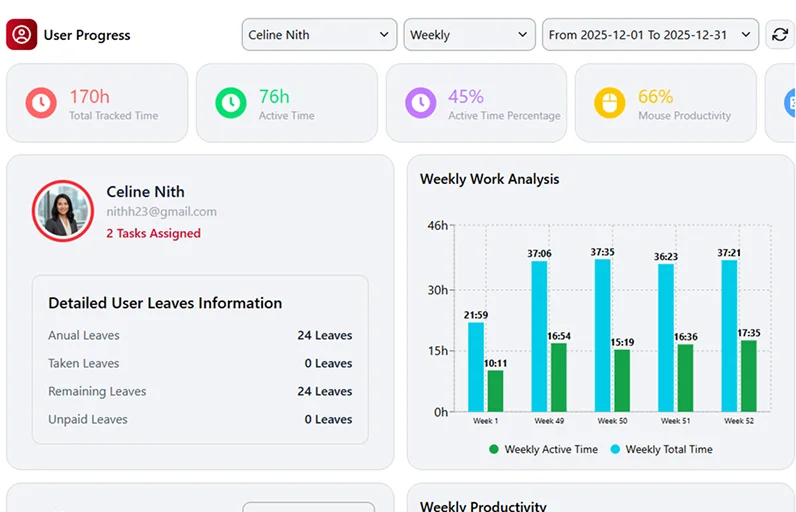
Monitor active and idle time in real time for accurate productivity insights, all visible in one clear analytics dashboard.
TeamTrackin automatically pauses time tracking when no activity is detected, so every logged hour reflects real work. Honesty is built into the system, not left to chance.
TeamTrackin ensures ethical monitoring with zero keystroke recording and zero privacy intrusion. Safety and privacy come first, always.
Real-Time Monitoring That Actually Helps
When teams know what’s expected and managers have clear visibility, productivity naturally improves. With TeamTrackin, managers don’t guess — they rely on real data. Here’s what you get:
- Real-time employee monitoring
- Time and attendance tracking
- Productivity tracking with activity insights
- Automated reports
- Accurate timekeeping
- Automated screenshots for accountability
Built for Ethical Employee Monitoring
TeamTrackin believes monitoring should support trust, not break it. It’s an ethical employee monitoring software designed to improve workflows, not create fear.
- No keystroke recording
- No microphone or camera access
- No spying behaviour
- Transparent tracking for accountability
For Whom Is TeamTrackin Built?
TeamTrackin is designed for every team size. With Role-Based Access Control (RBAC), you get separate manager and employee dashboards, along with clear permissions and visibility. Whether your team is remote, on-site, or global, TeamTrackin fits your workflow.
- BPOs & Call Centers
- Virtual Assistants (VAs)
- Freelancers
- Remote employees
- Hybrid teams
- Small businesses
- Enterprises with 100+ employees

Works Seamlessly on All Operating Systems
TeamTrackin is built for modern work environments.
No complex setup, no learning curve — just install and start tracking.
Start Free TrialYour Data Is Secure with TeamTrackin
No keystroke logging, no spying, no micromanaging — only productivity-focused monitoring.
Your data is stored and processed using secure, reliable cloud technology.
TeamTrackin follows industry-standard security protocols to prevent unauthorised access.
Sensitive company and employee data stays protected at all times, with a design built to support GDPR compliance.
No keystroke logging, no spying, no micromanaging — only productivity-focused monitoring your team can trust.
What is employee monitoring software?
Employee monitoring software records how working time is spent, so managers can see workload, progress and focus without standing over anyone's shoulder.
A clear picture of the working day
Good employee monitoring software answers simple questions with facts: who is working right now, how many hours went into each project, which apps and websites took up the day, and where time slipped away. It replaces status-update meetings and guesswork with a shared record that both the manager and the employee can see.
TeamTrackin includes monitoring on every plan from Basic. It sits on top of time tracking, so the same hours that build timesheets also show activity and focus.
Monitoring for trust, not surveillance
Monitoring only works when people know about it and can see their own data. In TeamTrackin every employee sees the same timeline, activity levels and screenshots their manager sees, and tracking only runs while their timer is on.
That openness turns monitoring into a coaching tool: managers spot overload early, employees can show the work behind their hours, and nobody has to justify their day from memory.
What TeamTrackin tracks, and what it never tracks
A short, honest list you can share with your team before you switch anything on.
What TeamTrackin records while the timer runs
Working time against projects and tasks, idle time, and activity levels based on how often the keyboard and mouse are used. The apps and websites in use, so time can be grouped as productive or not. Screenshots at intervals, on by default, which you can turn off for any person or blur on the computer before they are saved.
On the Premium plan you can also use random screenshots, which are taken at unpredictable moments inside each interval instead of on a fixed schedule.
What TeamTrackin never records
Keystroke content is never captured. TeamTrackin counts activity, it does not log what anyone types, so passwords, messages and documents stay private. There is no microphone or webcam access, and nothing is tracked when the timer is off or outside working time.
Employees can see their own data at any time, and admins decide who can view screenshots and reports. Read more on our security page about how data is stored and protected.
Is employee monitoring legal?
In most countries employee monitoring is allowed when it is proportionate, transparent and has a clear purpose. Local law decides the details, so this is general information, not legal advice.
Transparency, notice and a lawful reason
Data protection laws such as the UK GDPR and EU GDPR expect employers to tell staff what is monitored, why, how long data is kept and who can see it. Many employers rely on legitimate interests, backed by a short assessment showing the monitoring is necessary and not excessive. Some places also require consent or consultation with employees or works councils.
Always check the rules where your people work, and speak to a qualified adviser if you are unsure.
How TeamTrackin helps you stay proportionate
You choose what to collect: switch screenshots off for any person, blur them, let people delete a screenshot before it is sent, or keep only time and activity levels. Tracking only runs while the timer is on, keystroke content is never captured, and employees can see everything recorded about them.
These controls make it easier to write a clear monitoring policy and to show that you collect only what you need.
Employee monitoring software features
Everything you need to understand how work happens, with the privacy controls to use it fairly.
Activity levels
See how active each hour was from keyboard and mouse use, never from what was typed.
- Hourly activity percentages
- Idle time flagged
- Trends by person and team
Screenshots with privacy controls
Screenshots are on by default while the timer runs, with per-person on and off switches and blur.
- Turn off for any person or team
- Blur to hide detail
- Random screenshots on Premium
Apps and websites
See which apps and websites took up the day and group them as productive or unproductive.
- Top apps and sites per person
- Productive time at a glance
- Spot distractions early
Time and attendance
Know who is working now, when people started and stopped, and how hours compare with the plan.
- Live team status
- Start and finish times
- Timesheets built from tracked time
Employee self-view
Every employee sees their own timeline, activity and screenshots, the same data their manager sees.
- No hidden tracking
- Tracking only while the timer runs
- Manual time shows who added it
AI summaries and integrations
The built-in AI assistant, included on every plan with monthly credits, summarises a week of activity in plain words. Connect 36+ tools such as Jira, Slack and GitHub.
- Weekly summaries per person
- Ask questions about your team's time
- Works with the tools you use
How to roll out employee monitoring fairly
Four steps that keep your team on side and your monitoring proportionate.
- STEP 01
Write a short policy
Explain what is monitored, why, who can see it and how long it is kept. Check local law before you start.
- STEP 02
Tell your team first
Share the policy, show people the employee view and answer questions before anyone installs the app.
- STEP 03
Collect only what you need
Keep screenshots on, blur them or turn them off per person. Many teams use activity levels alone.
- STEP 04
Review together
Use the data in one-to-ones to balance workload and remove blockers, not to catch people out.
Employee monitoring software from $3.99 per user per month
Monitoring, time tracking and screenshots are included from the Basic plan, with the built-in AI assistant on every plan. Random screenshots come with Premium. Try it free for 14 days, no card needed.
Related TeamTrackin features
Monitoring works best alongside the rest of the platform.

Start Tracking Productivity the Smarter Way
Stop guessing how work hours are spent. Get real-time visibility, accurate time tracking, and ethical employee monitoring, all in one affordable platform.
Frequently Asked Questions (FAQs)
Employee monitoring software records how working time is spent: hours worked, activity levels, apps and websites used and, if you choose, screenshots. TeamTrackin shows this to managers and to the employees themselves, so both see the same picture.
No. Keystroke content is never captured. TeamTrackin only measures activity levels from keyboard and mouse use, and it has no microphone or webcam access.
Screenshots are on by default while the timer runs. Admins can turn them off for any person, blur them to hide detail, or keep only time and activity levels. Random screenshots, taken at unpredictable moments, are available on the Premium plan.
In most places it is allowed when it is transparent, proportionate and has a clear purpose, but local law such as the UK GDPR sets the details and some places require consent or consultation. This is general information, not legal advice, so check the rules where your people work.
Yes. Every employee can see their own timeline, activity levels and screenshots, the same data their manager sees, and tracking only runs while their timer is on.
Yes. The desktop app runs on Windows, macOS and Linux, and the mobile and web apps cover time away from a desk, so remote, hybrid and office teams are tracked the same way.
Plans start from $3.99 per user per month and monitoring is included from the Basic plan. Every plan comes with a 14-day free trial and no card is needed.